Skip to content

a gasperohlab product

← gasperohlab.com

gasper-zero / features

What it does.

Four modules, five security levels, an emergency lockdown and a dozen defenses. All of it runs on your device.

modules

Four modules. No chatter.

Pick one. See what it touches on each operating system, and where it stops.

kernel-ghost(1)kernel-ghost(1)

Kernel-Ghost

Name

kernel-ghost – switches off telemetry services, background analytics and diagnostic daemons at the system root.

Description

  • Finds the telemetry and analytics services your OS runs
  • Stops them through the OS's own service and policy controls
  • Logs every previous value, so it can be put back
  • A drift guard re-applies it all after OS updates

Touches

Scope, abridged. These are the real operating-system mechanisms each module works through, so you can check them yourself. Names, paths and defaults vary by OS version and edition.

scopeWindows 10 and 11. Where an edition ignores a policy, Gasper-Zero says so rather than reporting success.

Diagnostic and usage-data services, scheduled telemetry tasks and the matching policy settings.

  • serviceDiagTrackConnected User Experiences and Telemetry
  • servicedmwappushserviceWAP Push Message Routing, often paired with DiagTrack
  • serviceWerSvcWindows Error Reporting
  • registryHKLM\SOFTWARE\Policies\Microsoft\Windows\DataCollection · AllowTelemetryDWORD. 0 is honoured only on Enterprise, Education and Server; other editions treat it as the minimum level
  • registryHKLM\SOFTWARE\Policies\Microsoft\Windows\AdvertisingInfo · DisabledByGroupPolicyDWORD 1 turns the advertising ID off

Limits

Where an OS edition refuses (some Windows editions keep a basic level of diagnostic data), Gasper-Zero says so instead of pretending it worked.

Example

$ gz kernel-ghost

gz ghost [+] Enumerating telemetry services... [+] Stopped and disabled: diagnostics, usage reporting [!] Basic diagnostic level is enforced on this edition [+] Change log written. Revert with: gz undo

the four modules, one click

levels

Dial it to the situation.

One control sets every option across the four modules. Each can still be tuned.

security level, in the app
  1. Baseline

    Sensible defaults, almost no friction.

  2. Guarded

    Everyday privacy. Telemetry off.

  3. Hardened

    Strong for most people. Some apps will ask first.

  4. Fortified

    Untrusted networks and sensitive work.

  5. Maximum

    Everything on. Expect prompts and the odd broken app.

situation profiles

Five situation profiles apply a level plus extras in one click, and can switch by network.

  • Home L2
  • Work L2
  • Public Wi-Fi L4
  • Travel L4
  • High assurance L5

absolute-0

Absolute-0.

One switch that closes everything and keeps your computer usable offline.

Arming takes proof that it is you. Disarming is always manual.

scroll in

absolute-0

Everything closed.

Radios off, connections cut, data encrypted. Still usable offline.
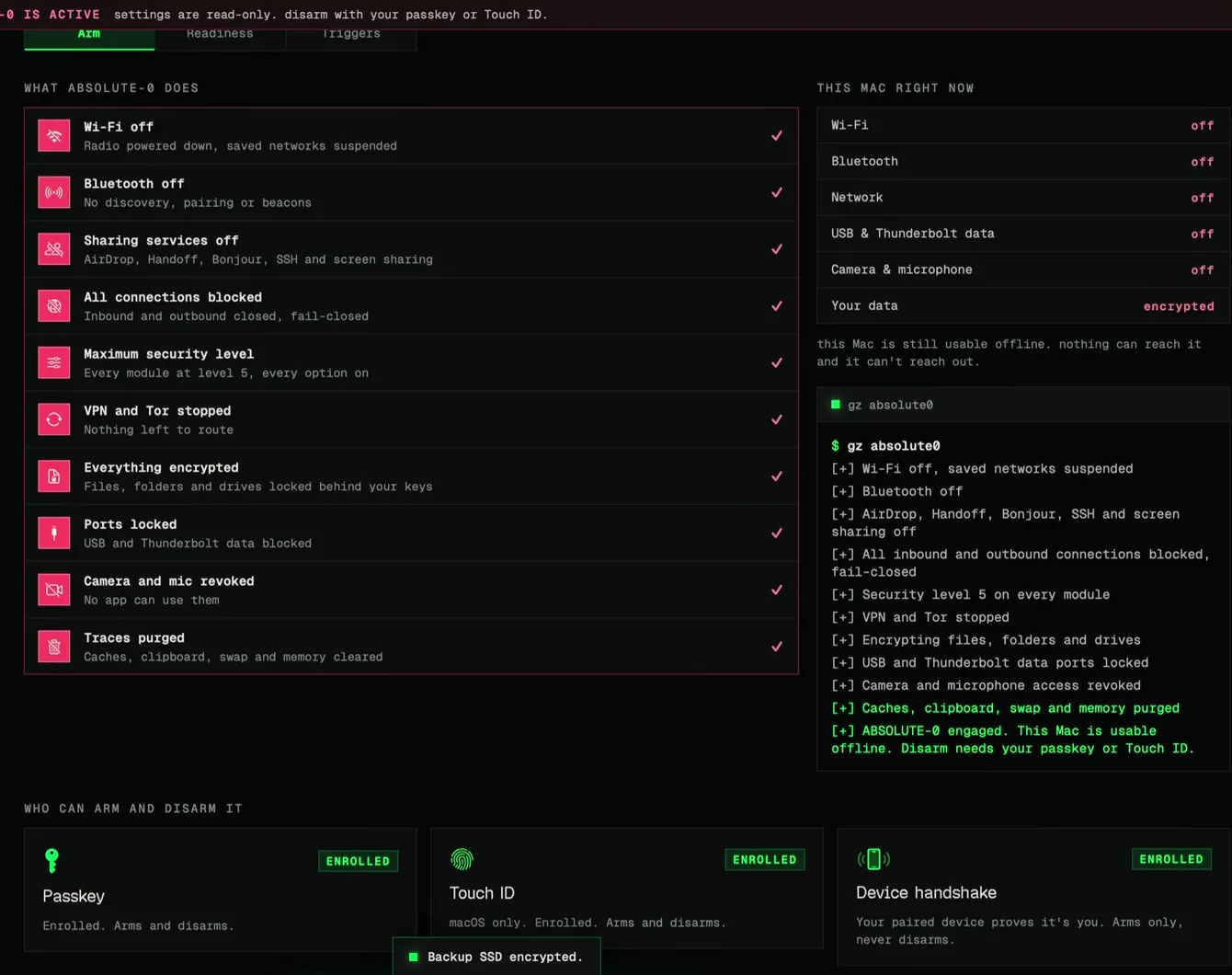
arming: confirm it's you
The Absolute-0 screen once armed: locked down, connections closed and data encrypted, with a disarm button and every step ticked
locked down, read-only until you disarm

what it closes

  • wi-fi off
  • bluetooth off
  • sharing services off
  • all connections blocked
  • maximum setting
  • vpn and tor stopped
  • everything encrypted
  • ports locked
  • camera and mic revoked
  • traces purged

the rules

policyyou choose
To arm
A passkey, Touch ID or a paired-device handshake. Any one, or all three: you choose.
To disarm
Always manual: passkey or Touch ID only. A handshake cannot.
While active
Read-only. Every setting is locked until you disarm.
it can also arm itself
Triggers
An unknown USB or Thunderbolt device, the lid closed somewhere new, a paired device out of range, tamper, failed unlocks.
Dead-man's switch
Arms if you stop checking in.
Duress passkey
Looks like a normal unlock, but quietly arms lockdown, opens a decoy workspace or destroys the master key.
Travel mode
Hides workspaces and asks for re-authentication in one tap.
Drill and re-check
A dry run shows what arming would do and changes nothing, and a re-check confirms every step is in place. Lockdown is meant to be all or nothing, never half-armed.

what absolute-0 does not do

Absolute-0 removes your computer's network attack surface and encrypts your data. It cannot protect a machine that was already compromised, or stop someone with physical access who has your passkey. Keep it safe.

defense

The setup a security professional runs.

Hardening is the base. These are the tools on top.

compartments

Keep your lives apart.

Isolated workspaces, each with its own route and storage.

threat monitor

Know when something changes.

Alerts for new login items, camera and mic use. One tap to block.

posture

Is this machine really locked down?

Scores the system's protections and fixes what it can.

network monitor

See who is talking.

Every connection, by app. Allow or block.

leak lab

Prove it. Don't trust it.

Live IP, DNS, IPv6 and WebRTC leak tests.

metadata scrubber

Share the file, not the fingerprints.

Strips location and author from files before they leave.

residual data

What is and is not cleaned.

What a purge removes, and what it cannot.

backups

A backup you've actually restored.

Encrypted, with restore tests and a ransomware tripwire.

identity

Be many people. Be linkable as none.

Personas that stay apart.

device

A quiet machine.

Radios, sensors, permissions and ports.

operations

Plan it. Run it. Leave nothing.

Incident, travel and hand-over guides.

trust center

Check it. Don't trust it.

What it changes, and what is still to do.

coming 2027

Get on the list.One email, when it opens.

Gasper-Zero is not public yet. Leave your details, tell us your platform, and we will email you when early access opens.

Everyone who joins now becomes a Founding Member.

gz waitlistone email, when early access opens
platform (optional)

or talk to us